

In December last year, we asked our members to start reporting their use of UKUPC frameworks by submitting this quick webform via the “Report Framework Usage” button found on every framework page of the LUPC website. The form requests framework title, reference, supplier, contract dates, and value.
Thank you to everyone who has been doing this. This is helping us to recover the correct framework levy from suppliers for re-investment into the delivery of high-quality services for members. Read more about why this is important.
Improvements
Following feedback from members, we have made some improvements to make it easier to report and allow members greater visibility of what is being reported for their organisation:
- Forms can now be completed without being logged into the LUPC website
- If you are logged in, the webform will automatically populate the first few lines of the webform based on your user login profile
- There is an organisation field as a drop-down menu ensuring naming consistency for the reports.
- You can view all records of framework reporting for your organisation in one place, including forms completed by you or any of your colleagues.
To find your reports on the LUPC Website:
- Go to your My LUPC page.
- Select the new Framework Reports tab.
- You’ll see a table listing your submitted framework reports.
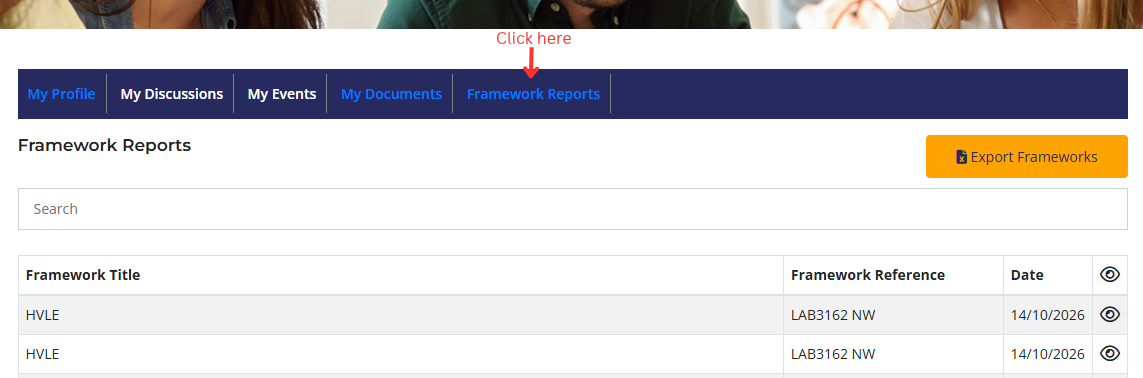
From there, you can:
- View a completed form by clicking the eye icon next to the report.
- Download the full list as an Excel spreadsheet by clicking the orange Export Frameworks button.
If you have questions, please contact Suzanne Picken.